
Google Ads Channel Controls: What a 5% Allocation Really Means
A setting that says “5%” looks straightforward. Before using Google Ads’ new channel budget controls, check what that percentage actually measures.
On October 14, 2026, Google announced channel prioritization and budget allocation controls, rolling out across Search, Shopping, Performance Max, and Demand Gen. They give advertisers another way to manage network spending beyond simply enabling or disabling a network. Availability varies during the rollout.
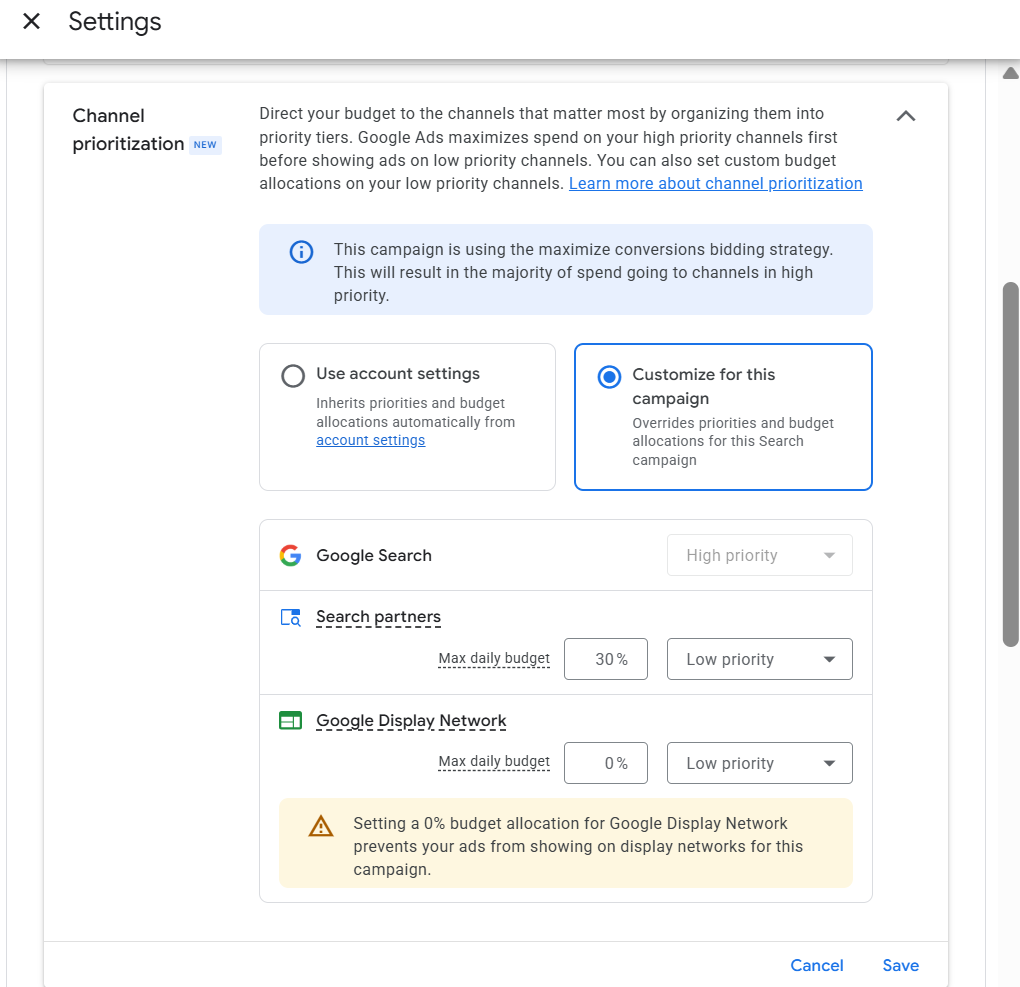
The useful part is more control. The risk is assuming the setting provides a tighter restriction than it does.
When reviewing a new advertising control, I want to know which decision it lets us make, what it actually changes, and how we will verify the result. This update deserves that same scrutiny.
Start with the number behind the percentage
Google calculates the allocation against the campaign’s average daily budget, rather than its actual spending. It is also a best-effort limit: daily channel spending can exceed the allocation, and unused or excess amounts do not carry forward.
Consider this hypothetical example:
-Average daily campaign budget: $400
-Low priority channel allocation: 5%
-Amount Google aims to stay within for that channel: $20
-Actual total campaign spending that day: $100
If the channel spends $20, it represents 20% of actual campaign spending. An advertiser expecting it to receive only 5% of the money spent would be looking for a $5 limit.
That distinction matters most when the budget is well above what the campaign normally spends.
Before choosing a percentage, write down the dollar amount you are comfortable with allocating to that channel. Then compare it with both the configured budget and recent actual spending. If those figures are far apart, the percentage alone gives you a poor picture of the test’s size.
Keep the best effort qualification in your reporting, too. An internal plan should not promise an absolute channel spending ceiling that the platform does not guarantee.
“Low priority” may change less than you expect
Google says high priority channels receive funding first, within the bidding target where applicable. However, for Target CPA or Target ROAS campaigns that are not limited by budget, priority alone generally will not change the spending distribution. A budget allocation can still apply.
So start by asking what currently limits delivery.
If the campaign already has unused budget, changing a priority label may not answer the problem you are trying to solve. You might be concerned about traffic quality, an aggressive bidding target, or a specific group of searches losing coverage.
Those are different diagnoses. Record the one you are testing before changing the setting.
For example: “We want to reduce our exposure to a network while evaluating whether its leads become qualified opportunities.” That creates a useful review question. “We set it to Low priority” only describes an action.
Match the control to the problem
In a recent account review, I pushed for separate campaigns because we needed independent budget control over different groups of searches. Putting them into separate ad groups would still have left them sharing a campaign budget.
The new channel controls operate at a different level. They do not replace that campaign structure decision.
There are also limits to the granularity. Performance Max groups Google surfaces together as “Google channels”; these controls do not provide a separate allocation for each surface. Demand Gen supports channel prioritization, but currently does not support budget allocation.
Write the desired outcome in plain language before selecting the tool:
-“Give this distinct search intent its own budget.”
-“Restrict how much we test on this network.”
-“Investigate why efficient searches are losing volume.”
-“Understand whether the additional conversions are valuable.”
A network allocation may help with the second objective. It cannot, by itself, answer the other three.
This is the same approach behind our PPC audits and diagnostics: identify the business problem first, then choose the account change.
Build a test you can actually evaluate
I would start with one suitable campaign and a short written test plan.
First, capture the baseline. Record recent spending, the existing network mix, bidding strategy, conversion goals, and the business outcomes available for comparison. Note other recent changes that could affect the result.
Second, decide what would justify continuing. For lead generation, that could include qualified opportunities and their acquisition cost. For ecommerce, it could include revenue after cancellations and the margin on the products sold. Choose measures the business can actually reconcile.
Third, state where the test money comes from. Are you accepting less spending elsewhere within the same budget, or approving additional spending? Do not leave that decision hidden inside a setting.
Fourth, avoid changing several major variables at once. If you also rewrite the ads, change bidding targets, and alter landing pages, interpreting the result becomes harder.
Finally, check both allocation and outcomes. Did the network receive the intended amount? Did total spending change? Did valuable conversions increase, or did traffic move from one part of the account to another?
Review delivery early enough to catch an unwanted spending shift. Judge conversion quality after the normal conversion delay for that business. A handful of inexpensive leads is a reason to investigate further, not a reliable verdict.
Put the February change on your review list
Google also says Search campaigns using Display Expansion will move to the new controls starting in February 2027. Its stated configuration for preserving the existing allocation behavior is Google Display Network at Low priority with a 50% allocation.
That is a migration detail, not my recommendation to allocate half your budget to Display.
If the account uses Display Expansion, review that setup deliberately. If it does not, this announcement is not a reason to enable it.
The next step
These controls are worth understanding, especially where a small network test would answer a real business question. Start with the dollar exposure, the campaign’s constraints, and the outcome you need to measure.
If you are unsure where your Google Ads budget is going, book a strategy call with Firestorm SEM. We can review the spending mix, campaign structure, and measurement before recommending what to change.